Problem
Nieczytelne komunikaty błędów.
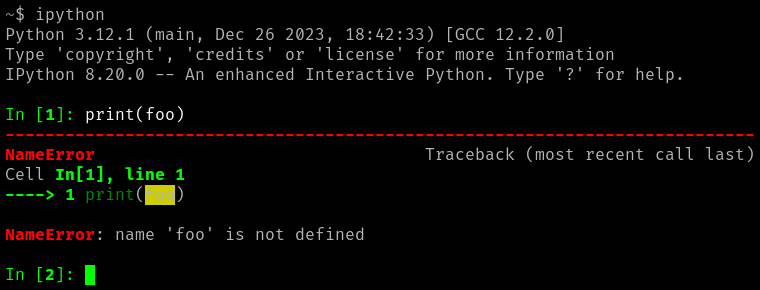
Rozwiązanie
$ ipython profile create
Opcja #1 - wyłączenie kolorów
.ipython/profile_default/ipython_config.py:
c.TerminalInteractiveShell.colors = 'NoColor'
Opcja #2 - zmiana w schemacie podświetlania
.ipython/profile_default/ipython_config.py:
try:
    from IPython.core import ultratb
    ultratb.VerboseTB._tb_highlight = "bg:ansired"
except Exception as e:
    print("Error patching background color for tracebacks:", e)
More information
Można wylistować wszystkie dostępne style:
$ pygmentize -L styles
Pygments version 2.17.2, (c) 2006-2023 by Georg Brandl, Matthäus Chajdas and
contributors.

Styles:
~~~~~~~
* abap:

* algol:

* algol_nu:

* arduino:
    The Arduino® language style. This style is designed to highlight the
    Arduino source code, so expect the best results with it.
* autumn:
    A colorful style, inspired by the terminal highlighting style.
* bw:
[...]
Nazwy kolorów można podejrzeć tutaj:
$ grep '^_ansimap' -A19 /usr/lib/python3.12/site-packages/pygments/style.py
_ansimap = {
    # dark
    'ansiblack': '000000',
    'ansired': '7f0000',
    'ansigreen': '007f00',
    'ansiyellow': '7f7fe0',
    'ansiblue': '00007f',
    'ansimagenta': '7f007f',
    'ansicyan': '007f7f',
    'ansigray': 'e5e5e5',
    # normal
    'ansibrightblack': '555555',
    'ansibrightred': 'ff0000',
    'ansibrightgreen': '00ff00',
    'ansibrightyellow': 'ffff00',
    'ansibrightblue': '0000ff',
    'ansibrightmagenta': 'ff00ff',
    'ansibrightcyan': '00ffff',
    'ansiwhite': 'ffffff',
}
Ustawienia dla podświetlania składni (nie działają dla błędów) są w zmiennej
TerminalInteractiveShell.highlighting_style.